When Should You Use a Lower-End AI Model?
When I am working with a fixed-price plan, I rarely think about how many tokens I am using. I pay $20 a month, and my bill does not immediately change based on how many queries I run. For employees using AI at work, the company is paying for the usage. Employees are not paying for every individual query, so they have little reason to think about token consumption.
Most people choose the most powerful AI model available to them.
I do the same.
When I am working with a fixed-price plan, I rarely think about how many tokens I am using. I pay $20 a month, and my bill does not immediately change based on how many queries I run.
For employees using AI at work, the company is paying for the usage. Employees are not paying for every individual query, so they have little reason to think about token consumption.
That makes it easy to use a high-end model for almost every task.
But the real cost of AI is still there. It is simply being carried by the company instead of the individual user.
As AI use grows inside companies, token consumption will become a bigger concern. The day is not far away when companies start looking more closely at which models employees are using and what they are using them for.
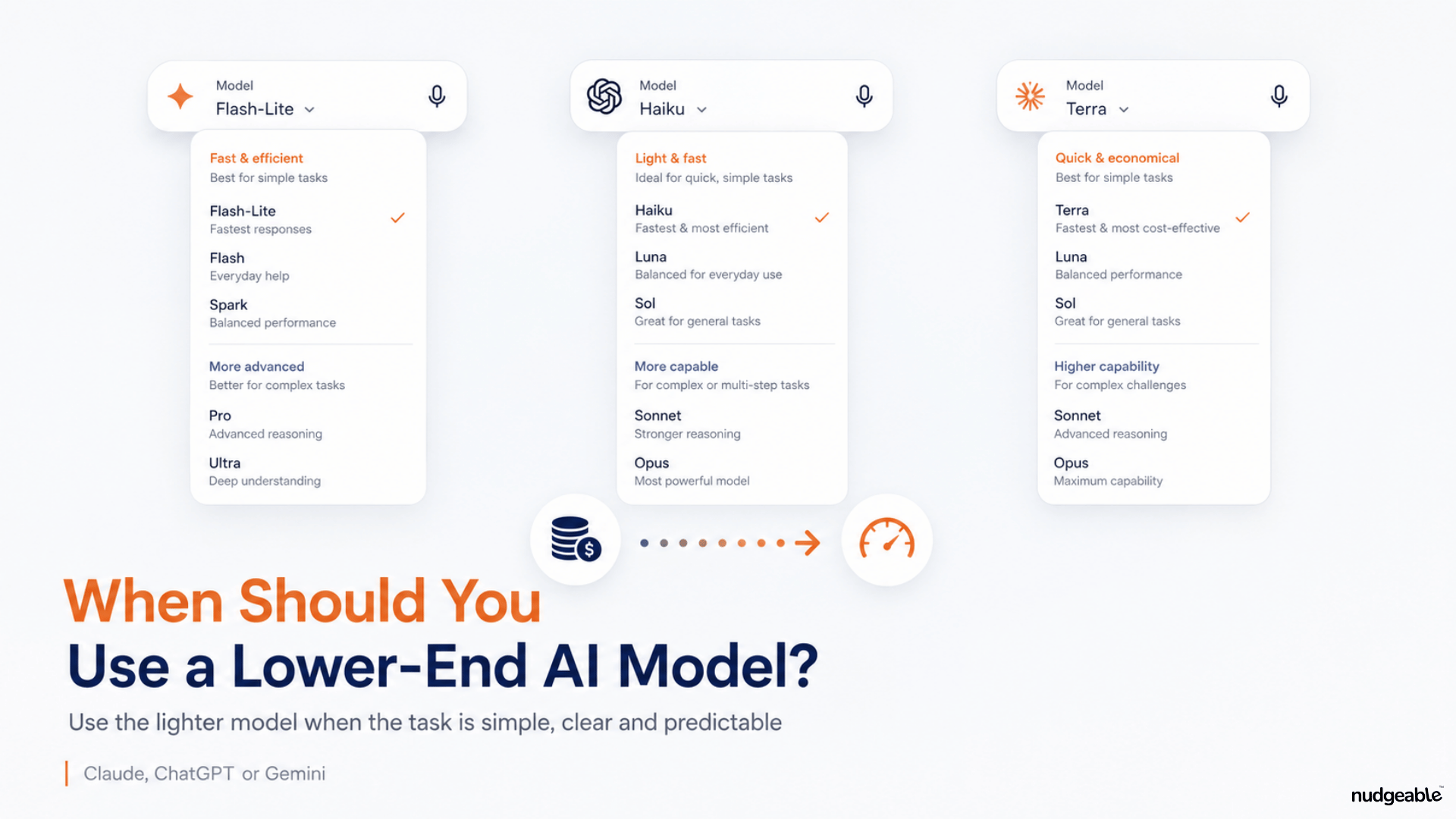
That is why it is useful to understand when a lower-cost model, such as Claude Haiku or GPT-5.6 Luna, may be enough.
Why do AI models have different levels?
AI companies offer several models within the same product.
The pricing gap is significant. Claude Haiku costs around $1 per million input tokens and $5 per million output tokens. Sonnet costs $2 and $10, while Opus costs $5 and $25.
OpenAI’s GPT-5.6 Luna costs $0.20 per million input tokens and $1.20 per million output tokens. Terra costs $2 and $12, while Sol costs $4 and $20.
Moving from the lowest-cost model to the flagship model can increase token cost by roughly five times for Claude and 15 to 20 times for GPT. These API prices are separate from the fixed monthly plans used by most individual users.
For routine, well-defined work, the lower-cost model is often enough.
The practical rule I use
The common thread across suitable lower-end tasks is simple:
A single document, a clearly defined output and no major judgment call.
The moment a task requires synthesis across several sources, interpretation of ambiguity, strategic thinking or a defensible recommendation, it becomes more useful to choose a stronger model.
For example, asking an AI model to correct the grammar in one document is a straightforward task.
Asking it to compare five documents, identify conflicting information and recommend a course of action requires more reasoning.
Here are five categories where a lower-cost model can often do the job.
1. Prepare large documents for later analysis
A lower-end model can be useful when you need to process or prepare a large document before analysing it in detail.
For example, you may upload a long report and ask the model to extract the headings, break the document into sections, remove repeated content or convert it into a structured format.
You can then use a stronger model to study the document, compare it with other information or develop recommendations.
This approach can reduce the cost of using an expensive model for basic preparation work.
The higher-end model can focus on the part that actually requires judgment.
2. Clean up and convert text
Text cleanup is one of the clearest use cases for a faster, lower-cost model.
You can use it to correct spelling, punctuation and grammar. You can ask it to make paragraphs easier to read or reformat existing text into headings, bullets or a specific template.
You can also ask it to convert plain text into Markdown, HTML or CSV.
For example:
“Correct the spelling and punctuation in this document. Do not change the meaning or tone.”
That is a well-defined request. The model does not need to interpret a complicated business situation or make a recommendation.
It simply needs to follow a clear instruction and return the text in the required format.
3. Extract or look up information in one document
Lower-end models can also handle many extraction tasks.
You can ask them to check whether a document contains a specific phrase or topic. They can extract dates, names, email addresses, URLs, prices or other predefined fields.
You can ask them to count words, characters, sentences or paragraphs. You can ask them to compare two numbers or dates that already appear in the document.
You can also ask them to find and replace a name, date or phrase throughout a file.
For example:
“Find every reference to the old company name and replace it with the new company name. Do not change anything else.”
This is different from asking:
“Read these reports and explain what the change in company name means for our customers.”
The first task involves a clear instruction inside one document. The second requires interpretation and analysis.
That is where a stronger model becomes useful.
4. Transcribe audio or meetings
Transcription is another task that can often be handled by a faster model.
The model needs to convert spoken language into written text. You may ask it to include speaker labels, add timestamps or remove filler words.
You can then use a more capable model to summarize the meeting, identify decisions, assess risks or create an action plan.
This separation is useful because transcription and analysis are different tasks.
The first involves converting one format into another. The second requires understanding what was discussed and deciding what matters.
5. Convert PDFs, images and scans into editable text
A lower-end model can also help convert a screenshot, scanned document or image-based PDF into editable text.
You may ask it to read the content and return it as plain text, Word-style paragraphs, Markdown or a table.
This is useful for old documents, printed forms, scanned invoices and screenshots of text.
Again, the task is mainly conversion.
If you then want the AI to assess whether the invoice is accurate, compare it with purchase records or identify suspicious entries, you may need a stronger model.
Why do people avoid lower-end models?
The main reason is simple: someone else is paying the bill.
If employees do not see the cost of each query, there is little personal motivation to reduce token usage.
There is also a perception problem.
A model called Fast may sound less intelligent. A name such as Haiku may not tell the user anything about when it should be used. The model selector often gives people the choice without explaining the trade-off.
In the future, we may see approximate cost displayed directly beside each model. AI platforms may also begin choosing the model automatically based on the task.
Until then, the practical rule is useful:
Use a lower-end model when the task involves one document, a clear instruction and a predictable output.
Move to a stronger model when the work requires comparison, synthesis, judgment or a recommendation that someone will rely on.
I believe around 5 to 10 percent of everyday AI activity can be handled by lower-end models without affecting the final outcome.
The challenge is learning to recognise those tasks before automatically choosing the most powerful model available.