APIs, MCPs, Connectors and Plugins Explained
AI chatbots can only work with other applications when they have the right connection and permission. This article explains APIs, MCPs, Connectors and Plugins in simple terms, with a short note on Extensions and Add-ins.
These four terms have confused many participants in my AI training programs.
Companies like OpenAI and Anthropic have not exactly made the terminology easier either.
But if you want to use AI for real work, you need to understand them.
At some point, you may ask ChatGPT, Claude or another AI chatbot to check your calendar, search your email, find information in your CRM, update a project management tool or work with data inside another application.
That is when APIs, MCPs, Connectors and Plugins start appearing in the conversation.
Here is the simplest way I understand them.
Let’s start with APIs because they came first
When AI chatbots were initially launched, they mainly generated text. They could not automatically access your Gmail, calendar, shared drive or company applications.
This problem existed long before AI.
Software applications do not allow another application to simply enter and read their data. Authentication and permissions are required.
But software applications have been communicating with each other for decades through something called an API, or Application Programming Interface.
An API is an agreed way for one software application to communicate with another.
Think about making a payment inside an ecommerce app using a payment service. The ecommerce app and the payment service are separate applications, but information moves between them and the payment gets completed without you manually transferring anything.
Behind the scenes, one company exposes certain capabilities through its API, while another company writes the code needed to use them.
APIs are the foundation underneath most software integrations.
Then AI chatbots came along
Now imagine Claude wants to access Gmail.
Technically, Claude could build an integration using Google’s APIs.
But as a user, I do not want to think about APIs, authentication tokens or code.
I simply want to click Connect Gmail.
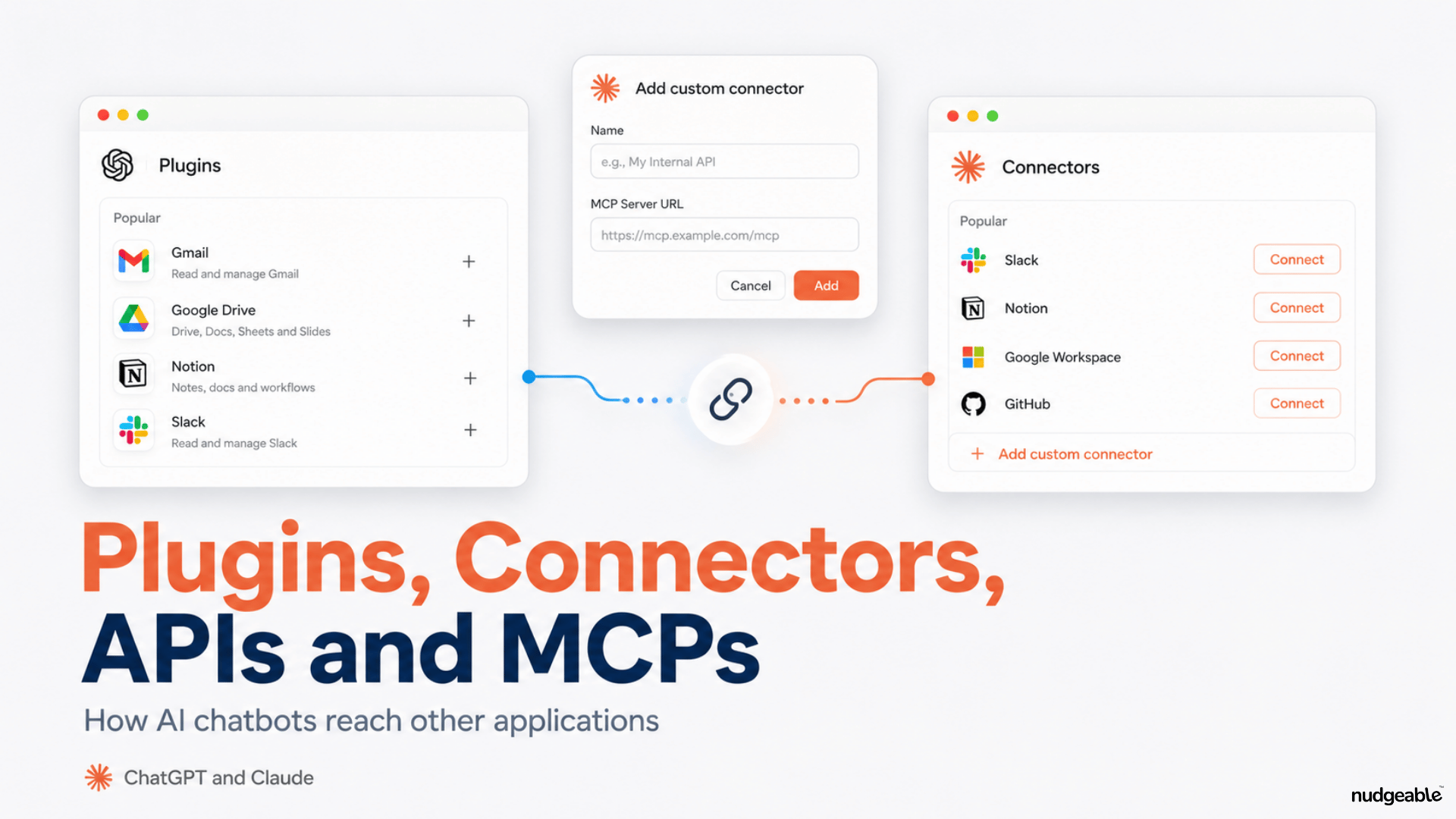
That user-facing connection is what Claude calls a Connector.
Once I connect Gmail and authorize access, Claude can use the information and actions that the integration is allowed to access.
So when I see a Connector, I think:
“I am giving my AI access to another application.”
The API may still be working underneath, but I usually do not see it.
This is why the word Connector became common as AI chatbots started connecting with Gmail, Google Drive, Slack, Notion and other applications.
So why did we suddenly need MCP?
Imagine there are 10 major AI assistants and thousands of software applications.
If every AI company had to create a separate integration for every application, the number of integrations would become enormous.
Now imagine I have built my own CRM called MyCRM.
I want someone to be able to say:
“Claude, check MyCRM and tell me which customers have not been contacted in the last 30 days.”
Claude will not automatically know what MyCRM is, where the customer information is stored or what actions the system allows.
I need to give the AI a structured way to understand and interact with my application.
This is one of the problems that MCP, or Model Context Protocol, helps solve.
Anthropic introduced MCP as an open standard for connecting AI applications with external tools and data.
Instead of every AI application inventing its own way to understand every external system, developers can expose tools and data through a common protocol.
The analogy I find easiest is USB-C.
Before common standards, different devices often needed different cables and connectors. A common standard made it easier for devices to work together.
MCP is trying to create a similar layer of interoperability for AI applications.
The button I click may still say Connector inside Claude or App inside ChatGPT. MCP can sit underneath that connection.
A Connector might use MCP. MCP may eventually call an application’s API.
That is why these terms overlap, even though they refer to different things.
One related term: Extensions or Add-ins
You may also come across the words Extension or Add-in.
If you see options to install Claude inside Excel, PowerPoint, Word or Outlook, that means Claude is being added directly to those applications.
A Chrome extension places Claude inside your browser, where it can read the page you have open, click, type and fill forms.
This is different from a Connector. A Connector gives Claude access to another service from within Claude. An Extension places Claude inside the application where you are already working.
ChatGPT can also work with some desktop applications through its own desktop features, but the terminology and available integrations differ across platforms.
Now comes the confusing part: Plugins
Different AI companies use the word Plugin in different ways.
In ChatGPT
OpenAI moved its previous App directory into the Plugin directory in July 2026.
Today, an App is the actual connection to an external service, such as Gmail, Google Drive, Slack or Outlook.
A Plugin is a broader package. It can contain Apps, Skills, MCP servers and other capabilities for a particular workflow.
For example, a sales plugin could include instructions for sales workflows and an App that connects ChatGPT to a CRM.
In Claude
Claude still calls external service connections Connectors.
But a Claude Plugin can bundle together Skills, Connectors and other capabilities for a particular type of work.
For example, a Plugin might be designed for HR, marketing, legal, finance or design work.
So when someone tells me, “Install a plugin,” my next question is usually:
“In which AI product?”
The exact meaning depends on the platform.
The simplest way to remember the difference
API: The traditional way software applications communicate.
Connector or App: The connection I see and authorize as a user.
MCP: A common protocol developers can use to make tools and data available to AI applications.
Plugin: A packaged capability that may contain Apps, Connectors, Skills and MCP servers.
Extension or Add-in: Software installed inside another application or browser so the AI can work there.
Do I need an API to work with Excel or PowerPoint?
Not necessarily.
If I upload an Excel or PowerPoint file into an AI chatbot, the chatbot may be able to read and work with that file directly. I do not need an API integration just to upload a file.
The situation changes when I want the AI to retrieve live information or perform actions inside another application.
Then some form of integration becomes necessary. That could involve an API, MCP server, Connector, App, Extension or a combination of these.
Why should a normal AI user care?
Because when an AI workflow fails, the model itself may be perfectly capable of doing the work.
It may simply have no way to reach the system where the work needs to happen.
For example, I may ask:
“Check my CRM, identify customers who have not been contacted for 30 days and draft follow-up emails.”
The AI may understand the task perfectly.
But if my CRM has no available integration, I have not enabled the connection, or my company administrator has not given the AI permission to access it, the workflow stops.
When an AI chatbot cannot work with another application, I check:
- Is there an App or Connector available?
- Has it been enabled and authenticated?
- Does the software provide an MCP connection?
- If not, does it expose an API?
- Does the AI need an Extension or Add-in to work inside the application?
The chatbot can act only in the systems it has a way and permission to reach.